Notifications
Vortex provides a flexible notification system that sends updates across multiple channels when deployments occur.
Notifications are triggered automatically during deployment to a hosting environment.
Channels
Configure notification channels in your .env file:
# Enable notification channels (comma-separated list)
VORTEX_NOTIFY_CHANNELS=email,slack,github
Available channels: diffy, email, github, jira, newrelic, slack, webhook
Global environment variables
These variables apply to all notification channels unless overridden by channel-specific settings.
| Variable | Required | Default | Location | Description |
|---|---|---|---|---|
VORTEX_NOTIFY_CHANNELS | No | email | .env | Notification channels (comma-separated) |
VORTEX_NOTIFY_PROJECT | No | VORTEX_PROJECT | .env | Notification project name |
VORTEX_NOTIFY_SKIP | No | Hosting | Set to 1 to skip notifications |
Deployment context variables
These variables provide deployment context information used by notification channels. They must be set by the hosting environment before calling the notification script.
| Variable | Required | Description |
|---|---|---|
VORTEX_NOTIFY_BRANCH | Yes | Git branch name |
VORTEX_NOTIFY_SHA | Yes | Git commit SHA |
VORTEX_NOTIFY_PR_NUMBER | No | Pull request number (empty for branch deployments) |
VORTEX_NOTIFY_LABEL | Yes | Human-readable deployment label |
Branch filtering
Each notification channel can be restricted to specific branches using
a VORTEX_NOTIFY_<CHANNEL>_BRANCHES variable. When set, the channel
only sends notifications for deployments on the listed branches
(comma-separated, exact match). When empty or unset, the channel runs
on all branches.
For example, to restrict New Relic notifications to only main and staging:
VORTEX_NOTIFY_NEWRELIC_BRANCHES=main,staging
New Relic defaults to main,master,develop. All other channels default to no filter.
Message templates and tokens
Most notification channels support customizable message templates using replacement tokens:
| Token | Description | Example |
|---|---|---|
%project% | Project name | My Project |
%label% | Deployment label | main or PR-123 |
%timestamp% | Current timestamp | 15/11/2025 14:30:45 UTC |
%environment_url% | Environment URL | https://example.com |
%login_url% | Login URL | https://example.com/user/login |
Default message template:
## This is an automated message ##

Site %project% %label% has been deployed at %timestamp% and is available at %environment_url%.

Login at: %login_url%
Email
Send deployment notification via email.
Setup
- Add
VORTEX_NOTIFY_EMAIL_FROMvariable to.envfile with the sender email address. - Add
VORTEX_NOTIFY_EMAIL_RECIPIENTSvariable to.envfile with recipients in formatemail|name(comma-separated for multiple).
Environment variables
| Variable | Required | Default | Location | Description |
|---|---|---|---|---|
VORTEX_NOTIFY_EMAIL_FROM | Yes | .env | Sender email address | |
VORTEX_NOTIFY_EMAIL_RECIPIENTS | Yes | .env | Recipients (format: email|name) | |
VORTEX_NOTIFY_EMAIL_PROJECT | No | VORTEX_NOTIFY_PROJECT | .env | Project name for email |
VORTEX_NOTIFY_EMAIL_MESSAGE | No | Default template | .env | Custom message template |
VORTEX_NOTIFY_EMAIL_BRANCHES | No | .env | Restrict to specific branches (comma-separated) |
GitHub
Post deployment status to GitHub pull requests.
Setup
- Create a GitHub personal access token.
- Add
VORTEX_NOTIFY_GITHUB_TOKENto your hosting provider's environment variables. - Add
VORTEX_NOTIFY_GITHUB_REPOSITORYto your hosting provider's environment variables.
Environment variables
| Variable | Required | Default | Location | Description |
|---|---|---|---|---|
VORTEX_NOTIFY_GITHUB_TOKEN | Yes | Hosting | GitHub personal access token | |
VORTEX_NOTIFY_GITHUB_REPOSITORY | Yes | Hosting | Repository in owner/repo format | |
VORTEX_NOTIFY_GITHUB_ENVIRONMENT_TYPE | No | ${VORTEX_NOTIFY_LABEL} | .env | Environment name (defaults to label, e.g. PR-123) |
VORTEX_NOTIFY_GITHUB_BRANCHES | No | .env | Restrict to specific branches (comma-separated) |
Example
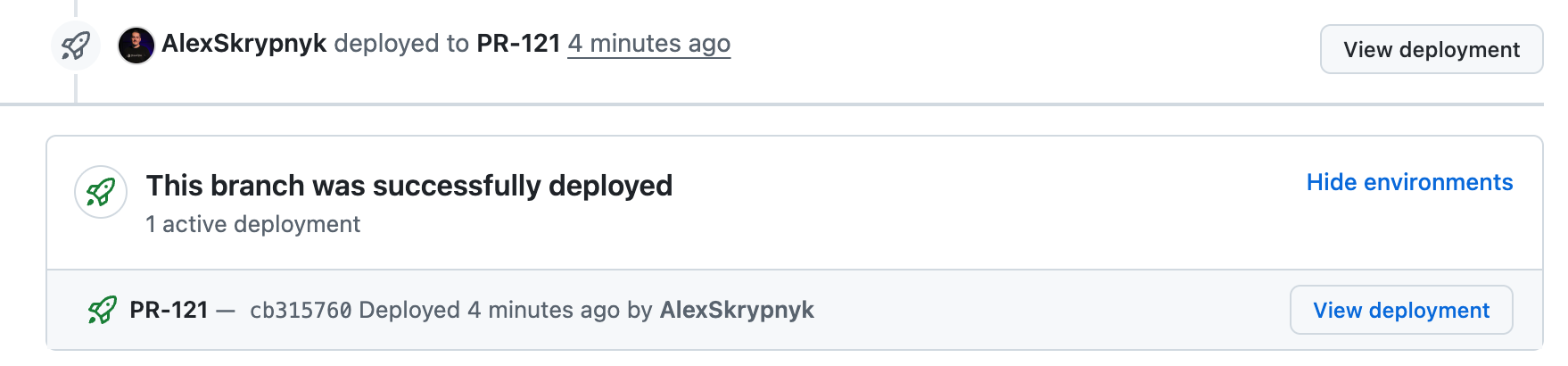
The pull request page shows deployment status with a View deployment button to quickly access the deployed environment.
JIRA
Post a deployment comment and optionally update issue status and assignee.
Setup
- Create a JIRA API token.
- Add
VORTEX_NOTIFY_JIRA_TOKENto your hosting provider's environment variables. - Add
VORTEX_NOTIFY_JIRA_USER_EMAILto your.envfile.
Environment variables
| Variable | Required | Default | Location | Description |
|---|---|---|---|---|
VORTEX_NOTIFY_JIRA_TOKEN | Yes | Hosting | JIRA API token | |
VORTEX_NOTIFY_JIRA_USER_EMAIL | Yes | .env | JIRA user email | |
VORTEX_NOTIFY_JIRA_PROJECT | No | VORTEX_NOTIFY_PROJECT | .env | Project name |
VORTEX_NOTIFY_JIRA_MESSAGE | No | Default template | .env | Custom message template |
VORTEX_NOTIFY_JIRA_ASSIGNEE_EMAIL | No | .env | Assignee email after deployment | |
VORTEX_NOTIFY_JIRA_TRANSITION | No | .env | Transition name (e.g., "In Review") | |
VORTEX_NOTIFY_JIRA_ENDPOINT | No | https://jira.atlassian.com | .env | JIRA API endpoint |
VORTEX_NOTIFY_JIRA_BRANCHES | No | .env | Restrict to specific branches (comma-separated) |
Issue key extraction
The notification system automatically extracts JIRA issue keys from the
deployment label using the pattern [A-Za-z0-9]+-[0-9]+:
feature/PROJ-123-add-feature→PROJ-123feature/PRJ-456-fix-auth→PRJ-456
New Relic
Create deployment markers in New Relic APM to track code changes alongside performance data.
Setup
- Create a New Relic User API Key
(format:
NRAK-XXXXXXXXXXXXXXXXXXXXXX). - Add
NEWRELIC_ENABLED(orVORTEX_NOTIFY_NEWRELIC_ENABLED) to hosting environment variables for environments where New Relic is configured. - Add
VORTEX_NOTIFY_NEWRELIC_USER_KEYto your hosting provider's environment variables.
Set NEWRELIC_ENABLED=true only in environments where New Relic APM is configured
(typically production and staging). This avoids API calls and potential errors
in development or feature branch environments.
Environment variables
| Variable | Required | Default | Location | Description |
|---|---|---|---|---|
VORTEX_NOTIFY_NEWRELIC_ENABLED | Yes | NEWRELIC_ENABLED | Hosting | Enable New Relic notifications |
VORTEX_NOTIFY_NEWRELIC_USER_KEY | Yes | Hosting | New Relic User API Key | |
VORTEX_NOTIFY_NEWRELIC_PROJECT | No | VORTEX_NOTIFY_PROJECT | .env | Project name |
VORTEX_NOTIFY_NEWRELIC_APP_NAME | No | Auto-generated | .env | Application name |
VORTEX_NOTIFY_NEWRELIC_DESCRIPTION | No | Default template | .env | Deployment description |
VORTEX_NOTIFY_NEWRELIC_CHANGELOG | No | Description | .env | Deployment changelog |
VORTEX_NOTIFY_NEWRELIC_USER | No | Deployment robot | .env | User performing deployment |
VORTEX_NOTIFY_NEWRELIC_ENDPOINT | No | https://api.newrelic.com/v2 | .env | API endpoint |
VORTEX_NOTIFY_NEWRELIC_BRANCHES | No | main,master,develop | .env | Restrict to specific branches (comma-separated) |
Example

Slack
Post deployment notifications to a Slack channel.
Setup
- Create a Slack app and Incoming Webhook.
- Add
VORTEX_NOTIFY_SLACK_WEBHOOKto your hosting provider's environment variables.
Environment variables
| Variable | Required | Default | Location | Description |
|---|---|---|---|---|
VORTEX_NOTIFY_SLACK_WEBHOOK | Yes | Hosting | Slack webhook URL | |
VORTEX_NOTIFY_SLACK_PROJECT | No | VORTEX_NOTIFY_PROJECT | .env | Project name |
VORTEX_NOTIFY_SLACK_MESSAGE | No | Default template | .env | Fallback text template |
VORTEX_NOTIFY_SLACK_CHANNEL | No | .env | Target channel (overrides webhook default) | |
VORTEX_NOTIFY_SLACK_USERNAME | No | Deployment Bot | .env | Bot display name |
VORTEX_NOTIFY_SLACK_ICON_EMOJI | No | :rocket: | .env | Bot icon emoji |
VORTEX_NOTIFY_SLACK_BRANCHES | No | .env | Restrict to specific branches (comma-separated) |
Event behavior
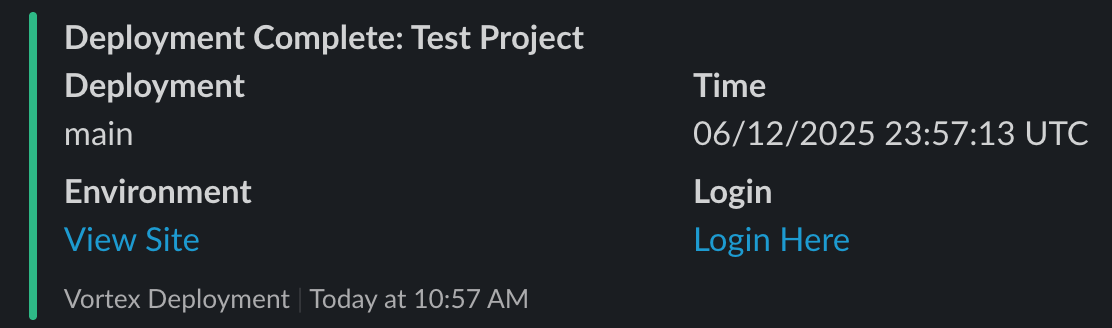
Slack notifications are sent for both pre_deployment and post_deployment events:
- Pre-deployment: Gray color with "Deployment Starting" status
- Post-deployment: Green color with "Deployment Complete" status
Example
Webhook
Send HTTP requests to arbitrary webhook URLs.
Setup
- Add
VORTEX_NOTIFY_WEBHOOK_URLto your.envfile or hosting environment variables.
Environment variables
| Variable | Required | Default | Location | Description |
|---|---|---|---|---|
VORTEX_NOTIFY_WEBHOOK_URL | Yes | .env or Hosting | Webhook endpoint URL | |
VORTEX_NOTIFY_WEBHOOK_METHOD | No | POST | .env | HTTP method |
VORTEX_NOTIFY_WEBHOOK_HEADERS | No | Content-Type: application/json | .env | Pipe-separated headers |
VORTEX_NOTIFY_WEBHOOK_PAYLOAD | No | Default template | .env | JSON payload |
VORTEX_NOTIFY_WEBHOOK_RESPONSE_STATUS | No | 200 | .env | Expected HTTP status |
VORTEX_NOTIFY_WEBHOOK_BRANCHES | No | .env | Restrict to specific branches (comma-separated) |
Default payload template
{
  "channel": "Channel 1",
  "message": "%message%",
  "project": "%project%",
  "label": "%label%",
  "timestamp": "%timestamp%",
  "environment_url": "%environment_url%",
  "login_url": "%login_url%"
}
The %message% token expands to the full deployment message with all other tokens replaced.
Diffy
Dispatch a visual regression run against the just-deployed environment via the shipped GitHub Actions workflow.
This channel does not call Diffy directly. It sends a GitHub
repository_dispatch event to the consumer repository; the
test-vr.yml workflow then runs the
actual Diffy comparison and posts the result back to the pull request.
Setup
- Enable visual regression during installation (or ship
test-vr.ymlmanually) - see Visual regression. - Add a GitHub token with
reposcope asVORTEX_NOTIFY_DIFFY_TOKENto the hosting environment (falls back toVORTEX_NOTIFY_GITHUB_TOKEN, thenGITHUB_TOKEN). - Add
diffytoVORTEX_NOTIFY_CHANNELS.
Environment variables
| Variable | Required | Default | Location | Description |
|---|---|---|---|---|
VORTEX_NOTIFY_DIFFY_TOKEN | Yes | VORTEX_NOTIFY_GITHUB_TOKEN, then GITHUB_TOKEN | Hosting | GitHub token with repo scope used to call repository_dispatch |
VORTEX_NOTIFY_DIFFY_REPOSITORY | Yes | VORTEX_NOTIFY_GITHUB_REPOSITORY | Hosting | Repository in owner/repo format |
VORTEX_NOTIFY_DIFFY_SOURCE_ENV | No | production | .env | Diffy source environment used as the baseline (production, staging, development) |
VORTEX_NOTIFY_DIFFY_EVENT_TYPE | No | vr_run | .env | repository_dispatch event type the workflow listens for |
VORTEX_NOTIFY_DIFFY_BRANCHES | No | .env | Restrict dispatch to specific branches (comma-separated). When empty, every deployment dispatches and the workflow gates on PR label |
Event behavior
Diffy dispatch only runs for post_deployment events. pre_deployment is
skipped because the target environment is not yet ready for comparison.